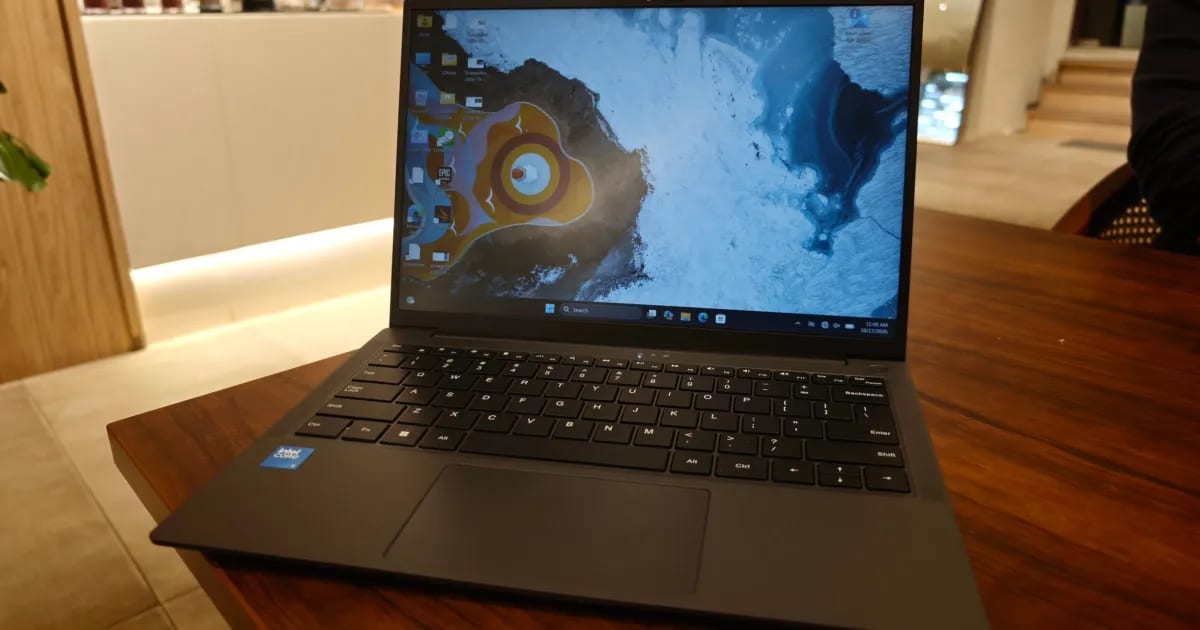
Cheap Windows laptops have a bad reputation for slow parts, flimsy bodies and poor screens. The $449 Chuwi UniBook mostly avoids that. A Digital Trends reviewer used it as a main work laptop for much of a two-week test and said it behaved like a decent laptop.
What it is built for
The test covered lots of web browsing, WordPress, meetings, writing, research and video. That is the kind of work this laptop is meant for. It runs on Intel's new Core 3 304 chip, built on Intel's latest 18A manufacturing process, so it is not an old chip recycled for the budget market. It has five cores and focuses on efficiency. The reviewer said it is not a speed demon, but it is responsive enough to be usable.
Body and ports
The UniBook weighs 1.2kg, a bit less than the reviewer's usual Zenbook 14. It is 16.4mm thick and made of aluminum. There is a little flex in the keyboard area and underside, but the lid is stiff, and the reviewer noticed no creaking or loose panels. The hinge is stiff enough that opening the lid with one hand lifts the whole laptop.
Ports are a big selling point. The reviewer never needed a dongle.
- Two USB-C ports that handle charging and video output
- Three USB-A ports for older devices
- HDMI and Gigabit Ethernet
- A microSD slot and a headphone jack
The USB-C ports run at 5Gbps, slower than USB4. The reviewer called that easy to forgive at this price.
Where it cuts corners
The screen is the giveaway. It is a 14-inch, 1920 x 1200 matte panel at 60Hz with 300 nits of brightness. It covers only 60% of sRGB, a standard measure of color range, so colors look washed out. Reds lack punch. Scrolling looks less smooth than on a 120Hz screen.
Still, the reviewer found it fine for spreadsheets, essays, research, Netflix and ordinary office work. The matte coating controls reflections and the brightness works indoors. It is also acceptable outside unless the sun is harsh. Photo editing and other color-sensitive work are not recommended.
What is still unclear
The summary of the review says the laptop gives up some memory headroom and graphics power. It also praises battery life as excellent. The text available here does not give memory size, battery hours or where the laptop is sold, so check those details before buying.
The takeawayFor browsing, email and office work, the $449 UniBook looks like a sensible buy, but skip it for photo editing or anything where color accuracy matters.