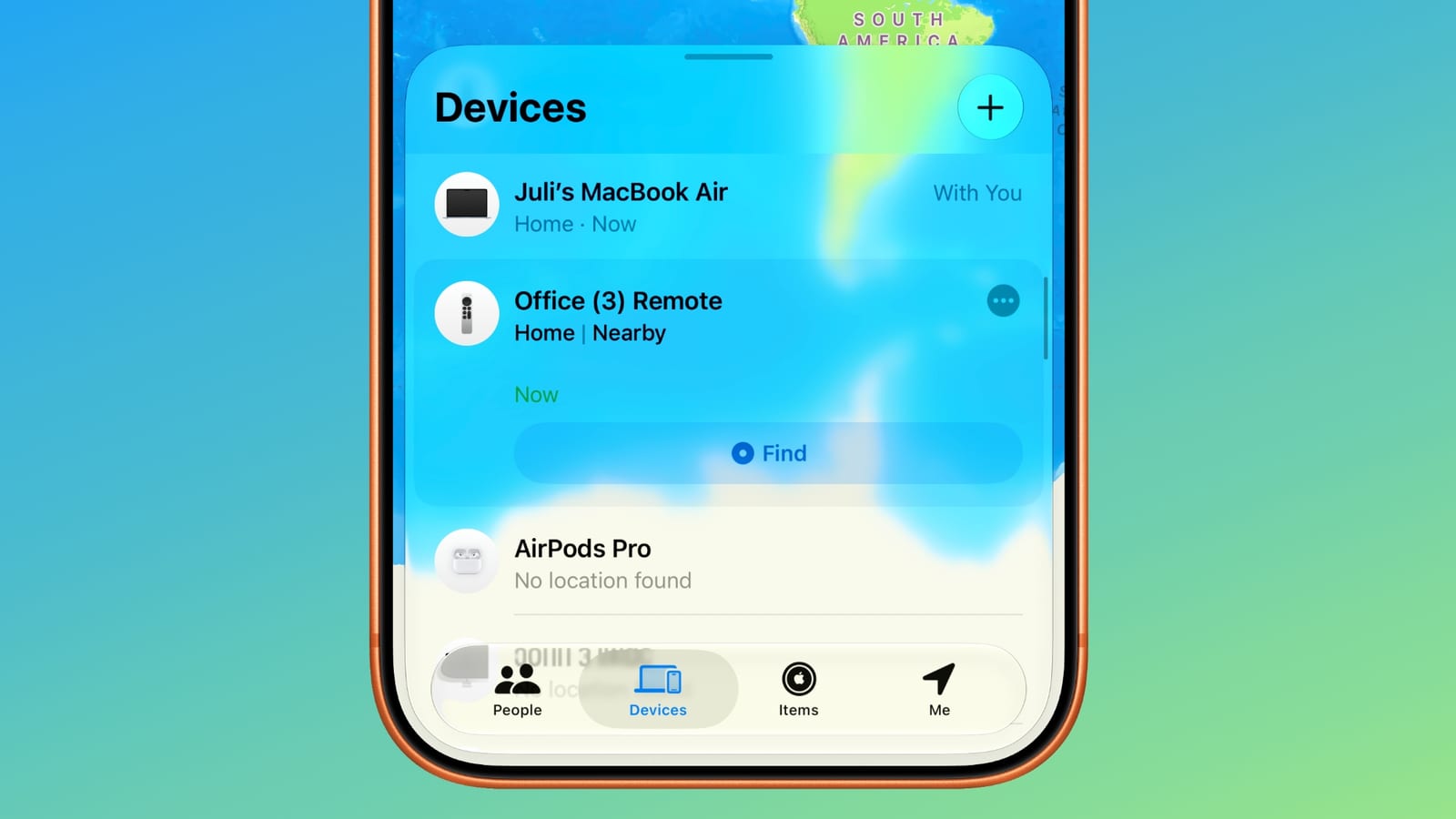
Apple has made it simpler to find a lost Apple TV remote. With iOS 27.2 and tvOS 27.2, second- and third-generation Siri Remotes now appear in the Find My app, the same app used to locate other Apple devices.
What changed
An iPhone has been able to locate a lost Siri Remote since iOS 17. But remotes did not show up in Find My. Instead, you had to use the Apple TV Remote widget in Control Center, which made the option hard to find. Now supported remotes are listed in Find My right alongside your other devices.
What older remotes cannot do
The upcoming fourth-generation Apple TV 4K adds a speaker and Precision Finding to its Siri Remote. Precision Finding is a feature that helps you locate a misplaced item more exactly. Older remotes cannot play a sound and do not have Precision Finding, so they gain tracking in Find My but not those extras.
When Apple announced the fourth-generation Apple TV, it said Find My support would reach the second-generation Siri Remote and later. That support is available now. The material does not say how precise the tracking is on older remotes.
The takeawayIf you own a second- or third-generation Siri Remote, update to iOS 27.2 and tvOS 27.2, then look for it in Find My.